Conducting a PQ Survey and Taking Corrective Action
Key Takeaways
- Proper meter setup includes firmware updates, calibration, and precise time synchronization to ensure accurate event correlation.
- Strategic placement of monitoring equipment — near loads, upstream, or at the PCC — maximizes insight into specific power issues.
- Correct wiring and configuration of voltage and current connections are critical to obtaining valid data and avoiding misleading results.
- Data analysis involves correlating PQ events with equipment symptoms, inspection records, and operational logs to identify root causes.
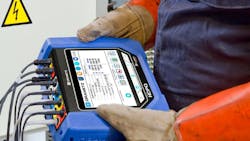
In this final installment of this three-part power quality survey series of articles, we walk through how to conduct the power quality (PQ) survey itself, analyze the results in a structured way, and take corrective action based on what you find. Whether you’re resolving issues on one load or evaluating overall facility health, the goal is to gather usable data, take the right steps, and confirm problem resolution.
In case you missed it, read the first (How to Get Started with Power Quality Surveys) and second (Planning and Preparing a Power Quality Survey) articles in this three-part series.
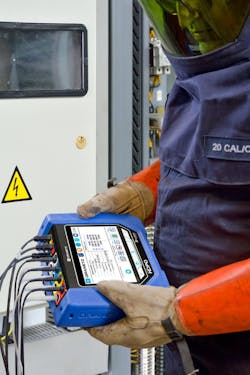
Setting up the PQ meter
Again, it’s recommended to use an IEC 61000-4-30 Ed 3 Class A compliant PQ instrument. Before recording data, make sure:
- The meter’s firmware is current.
- The meter has been recently calibrated.
- Its internal clock is set correctly, including the correct time zone.
Timestamps matter. Your ability to correlate PQ events with processes, equipment faults, and other meters depends on accurate time alignment. When using multiple PQ (or other) meters simultaneously, it may be beneficial to use an external time synchronization source (if available), such as NTP or GPS. This will give you the confidence to correlate PQ events accurately to recordings of other meters or systems.
If the meter supports remote access, test the connection (Ethernet, Wi-Fi) before closing panels or stepping away. And remember to always follow facility safety rules, such as those outlined in NFPA 70E, comply with company and local policies, and ensure only qualified personnel perform testing and use appropriate personal protective equipment (PPE).
Meter placement
Where you monitor directly shapes the insights you get. Placement should align with the symptoms you’re chasing.
- Single load issue? Place the meter as close to the affected equipment as possible. Monitoring at the equipment terminals or panel feeding the equipment is ideal.
- Multiple loads or area-wide issue? Go upstream. Use the distribution panel feeding that section.
- Facility-wide issue or baseline check? Start at the point of common coupling (PCC) with the electric utility, which is usually near the revenue meter.
You must monitor both voltage and current. Voltage shows you the disturbance, but current reveals the load information and PQ event directivity. For example, the relationship between the voltage and current for an upstream sag/dip will look different than one generated by a downstream load.
For voltage
Make sure that the meter is specified to operate in the voltage range to be measured. Each meter voltage connection should go to the corresponding circuit phase as directed by the meter manufacturer. Ensure your instrument connections match the wiring of the circuit or load. This is usually wye versus delta, but there are, of course, other wiring configurations.
For a 3-phase circuit, if there is a neutral, then you have the choice of connecting as a wye (phase to neutral) or delta (phase to phase). Although metered values in a wye circuit are easier to understand, it's recommended to connect the meter in the same way as the load is wired, which could be delta. This way, the meter is seeing what the load is seeing.
Note that delta circuits can be a little confusing due to the inherent 30-degree phase shift between the phase-connected voltage and line-connected current. It appears to throw off the individual phase power factor and other metered values. It is all correct, but can be confusing.
For current
Also, follow the meter manufacturer's guidelines and choose an appropriate current transformer (CT). Both the physical size and amperage are important. Make sure the CT can safely and properly close around the conductor and that its range is appropriate for the circuit under test-voltage and current ratings. Saturating a CT by measuring a load above its range can cause misleading readiness. On the flip side, measuring too low a current when using a large CT can also cause inaccuracies and noise pickup.
Make sure that each current probe is connected to its corresponding voltage phase. Also, confirm the CT orientation. For flex and clamp CTs, there is usually an arrow that should point towards the load.
In summary, verify circuit connections before you walk away. Miswired CTs or voltage leads can lead to useless or misleading data.
The monitoring process
Follow these guidelines:
- Verify wiring connections to the PQ instrument:
- Before starting, verify that your voltage and current wiring to the instrument is correct as described above.
- Use your instruments' real-time scope and/or phasor capabilities as a final confirmation of correct wiring. Sometimes, one-line diagrams, schematics, or as-built wire markings are incorrect. Look for:
■ Correct phase sequence of voltage based on your wiring configuration. For example: A, B, C and not A, C, B, etc.
■ Current readings correspond to their respective voltage channels (e.g., A current correlates to A voltage, etc.)
■ The orientation of each current probe is correct. If the arrow points towards the source instead of the load, the current waveform will appear inverted and 180 degrees out of phase with the voltage.
■ Most circuits are inductive, so the current will lag the voltage. If the voltage is leading the current, it could be miswired.
- PQ instrument triggers settings. Configuring your PQ instrument and the actual trigger settings is application dependent, but here are some rules of thumb:
- Set the instrument's trigger limits (i.e., sags/dips, swells, harmonics) to match the specifications of the load under test. If there are multiple loads in the circuit, use the load with the tightest specs. As an example, if the load has a voltage specification of +5% and -8%, set the instruments' high and low limits to those values. If you don’t know the tolerances of your load(s), then setting the voltage limits to +/-10% is a good place to start. Follow the same logic for harmonics and other limits where applicable.
- Trend, but do not trigger on current unless necessary. Current can vary greatly, and improper current triggers can record a lot of data with little added value.
- Periodic or journal recording of your PQ instrument. These are periodic fixed-time recordings of your measured parameters, typically every 10 or 15 minutes. This interval may be user-adjustable from seconds to hours, depending on the instrument. Many PQ instruments will record the minimum, maximum, and average at each of these intervals. These recorded values can be trended over time (time plots), which is valuable information.
- Start monitoring, but don’t leave yet!
- Check the real-time measurements to confirm the voltage and current readings are as expected, for instance, a 480V circuit is reading around 480V. A common mistake is to use delta settings for a wye circuit, or vice versa. Or, maybe a wire fell off…?
- Let the instrument record for a short time, then review your recorded data. Are PQ events being continually recorded? If so, you may have found your problem immediately or have an improper trigger setting.
- If the above is fine, then you can leave comfortably, knowing your PQ meter is configured and recording properly.
Data analysis
Once your monitoring period is complete — whether that’s a week or a full operational cycle — it’s time to dig into the data. This is where everything from your inspection notes to your event logs comes into play.
Start by aligning PQ event timestamps with when equipment problems occurred. Are there PQ events that align with equipment downtime or failure? Compare those events to the equipment’s operating specs. Even brief excursions outside the tolerable range can cause resets or process interruptions. Some issues are clear-cut. Others may require a more layered approach:
- Review the periodic journal trends. Maybe the voltage or other recordings are near, but may not have exceeded the instrument's limits or equipment specifications. Equipment may not always meet its specifications and may be affected when operating near its tolerances.
- Match event frequency and severity of the data recorded with known symptoms. Variations in voltage, current, harmonics, etc., may correlate with equipment problems even though the measurements may not trigger or be close to limits.
- Bring in inspection records from earlier in the process. Correlate field observations like buzzing panels, hot transformers, or flickering lights with electrical data.
Remember that there can be multiple sources for equipment problems and downtime, and power is just usually the first to be blamed. The main intent of PQ monitoring is to rule power in or out as the source of problems. If there are power problems, then the data captured by the PQ instruments should help determine the source of the problem, next steps, and corrective actions.
PQ monitoring can also help rule out power as the source of problems, so you can look elsewhere. There are other sources, such as intermittent equipment failures or software glitches.
The corrective action plan
Now that you know what’s happening and likely why, the next step is to fix it, methodically and safely.
Some problems are comparatively easy to resolve. Start with what’s easy and obvious. Fix any loose connections, wiring errors, or other obvious problems. These low-cost repairs often solve high-impact issues.
If the problems persist, do you or your organization have the skill set and capabilities to design and implement corrective measures? Is an electrical contractor or consultant needed to properly address the issue? Designing and implementing harmonic filters, UPS systems, new transformers, and other mitigation solutions may require a different skill set to be done properly and safely. When choosing a contractor or consultant, be sure to review their background and qualifications, and get references to make sure they are the right choice.
The follow-up survey
Once changes are in place, repeat the PQ survey. Use the same monitoring locations, thresholds, and recording intervals. This apples-to-apples comparison is the best way to confirm that the problem is truly resolved, and to ensure you haven’t introduced new ones in the process.
Consider continuous monitoring
For facilities with critical operations or chronic disturbances, continuous PQ monitoring is worth considering. Permanent monitors at the PCC, main panels, and critical loads provide real-time alerts and historical trend data. This shifts you from reactive troubleshooting to proactive maintenance. Continuous monitoring enables faster diagnosis when problems occur and provides ongoing system health visibility. It can also provide data necessary to justify future upgrades or protection strategies.
Final thoughts
Power quality problems aren’t abstract; they show up in downtime, failures, and lost hours. But they’re also fixable. A well-run PQ survey is your best tool to see what’s really happening, take corrective action, and keep your system operating the way it should.
Five PQ Survey Rules to Observe
There are five simple rules to keep in mind while performing a power quality survey:
- Apply the test of reasonableness.
If the data doesn’t make sense, step back and reassess. Basic laws of physics cannot be temporarily repealed to make something believable. - Know the limits of your test equipment.
Don't expect a multimeter or energy meter to solve what requires a PQ monitor. Understand the safety limitations of monitoring and test equipment. - Look for the obvious.
Most power problems are solved like peeling onions – one layer at a time. - Don’t get buried in small stuff.
Set reasonable monitor thresholds, concentrate on the larger events, and then work your way down. - Document and verify.
Always re-measure after fixing the problem. Document all actions taken.
About the Author
 Ross Ignall
Ross Ignall
Ross Ignall is the Director of Business Development and Marketing at Dranetz Technologies, a GMC Instruments company, where he has more than two decades of experience in power monitoring and analysis. With a background in engineering and product management and a career focused on instrumentation, power quality and energy solutions, Ross has been instrumental in building the GMC Instruments brand Dranetz. He works closely with engineers, utilities, and facility teams to align technology with real-world needs. A published author, IEEE and IEC committee member, and speaker in the fields of instrumentation, power quality, and demand/energy, he is a trusted resource in helping organizations take a smarter, data-driven approach to power system reliability. Ross can be reached at [email protected].